Why aren't UTM parameters and gclid being passed through to HubSpot?
Last updated: July 30, 2026
Context
When leads submit a form through Surface, UTM parameters and Google Click IDs (gclid) may not always appear in HubSpot. This can affect paid search attribution, campaign reporting, and the ability to match conversions back to Google Ads. There are several potential causes for this issue.
Answer
There are a few common reasons why UTM parameters or gclid values may not be syncing to HubSpot, along with their respective fixes:
1. HubSpot Tracking Script is not enabled
HubSpot uses its tracking script to auto-populate fields like lead source, lead campaign, and UTM parameters. If the tracking script is not installed in Surface, these fields will not be populated.
To fix this:
Go to your Surface environment settings.
Navigate to HubSpot Tracking > Tracking Script.
Enable tracking and paste in the HubSpot tracking script from your HubSpot account.
2. UTM parameters are not configured as hidden fields in the workflow
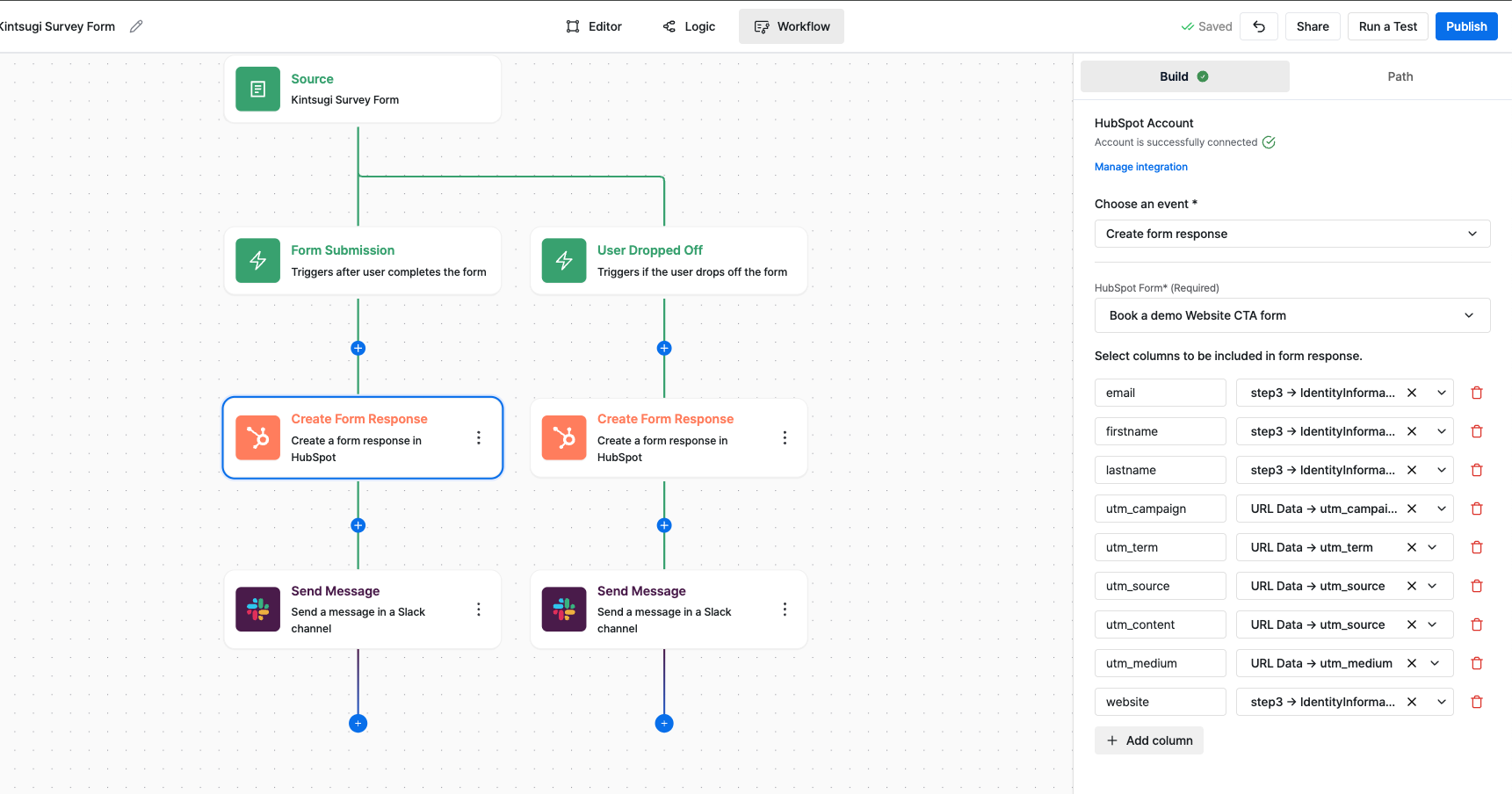
UTM parameters need to be explicitly mapped and sent to HubSpot via the Surface workflow editor. If they are not set up as fields in the workflow, they will not be forwarded to HubSpot even if Surface captures them.
To fix this:
Open the Workflow Editor in Surface.
In the HubSpot form response action, add UTM parameters (e.g.,
utm_source,utm_medium,utm_campaign) as fields to be sent.Ensure the correct HubSpot form is selected in the workflow (e.g., confirm you are targeting the right form name).
Publish the updated workflow.
Below is an example of a correctly configured workflow that includes UTM parameter mapping to HubSpot:
3. The gclid is being stripped during page navigation
If a user clicks a paid ad and then navigates to another page before submitting the form, the gclid can be dropped from the URL. This means the conversion cannot be tied back to the original Google Ad click.
To fix this:
Ensure the gclid is persisted across page navigation on your website (this typically requires a web team fix, such as storing the gclid in a cookie or session and re-appending it before form submission).
As an interim measure, point paid landing page CTAs directly to an embedded form rather than routing through intermediate pages, to reduce the chance of the gclid being dropped.
Note: HubSpot's own tracking script may capture the gclid independently via the hs_google_click_id field, even when Surface's URL parameter capture is empty. You can use this native HubSpot field as a fallback for Google conversion matching while the Surface-side capture is being fixed.
4. A bug caused form submissions not to sync to HubSpot
In some cases, a system-level issue may prevent form submissions — and therefore UTM data — from syncing to HubSpot. This has previously occurred when a meeting-booking integration (such as an embedded scheduler) was involved. Surface has a built-in retry layer to recover data in the event of such issues.
If you notice UTM data or lead records missing in HubSpot, contact Surface support so the team can investigate backend logs, identify affected submissions, and perform a backfill if necessary.
5. The URL had no UTM parameters when the form was submitted
If a lead navigates to the form page without UTM parameters in the URL (e.g., they arrived organically or via a direct link), there will be no UTM data to capture. In these cases, HubSpot's tracking cookie (hubspot_utk) may still retain UTM data from a prior session, which is why UTMs sometimes appear in HubSpot but not in Surface.
This is expected behavior and does not indicate a bug.